WebService学习系列之CXF开发WebService
创建时间:2019-11-02 21:55
字数:3.1k
阅读:
WebService学习系列之CXF开发WebService
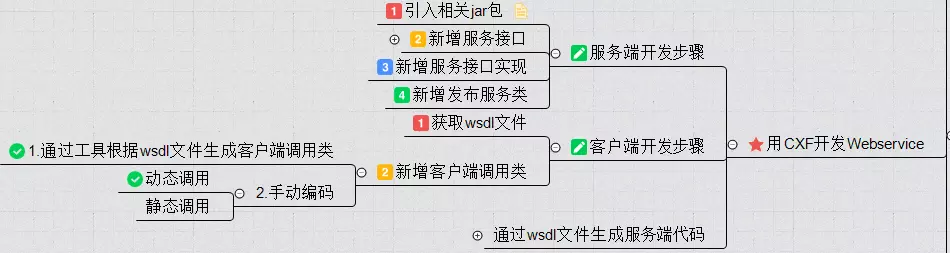
手动编写服务端代码开发分为四步:
手动编写客户端代码开发分为两步:
服务端客户端全自动生成代码
通过wsdl文件生成服务端代码和客户端代码的工程中不需要引入任何cxf的jar包(真强大,axis2框架生成的代码还需要引入axis2的jar包)
手动编码服务端开发 1.引入cxf相关jar 1 2 3 4 5 6 7 8 9 10 11 12 13 14 15 16 17 18 <dependencies> <!--添加cxf支持 --> <dependency> <groupId>org.apache.cxf</groupId> <artifactId>cxf-rt-frontend-jaxws</artifactId> <version>3.1.9</version> </dependency> <dependency> <groupId>org.apache.cxf</groupId> <artifactId>cxf-rt-transports-http-jetty</artifactId> <version>3.1.9</version> </dependency> <dependency> <groupId>org.apache.cxf</groupId> <artifactId>cxf-core</artifactId> <version>3.1.9</version> </dependency> </dependencies>
2.新增服务接口 在接口上添加注解@WebService(serviceName=”MyHelloWorldService”)
1 2 3 4 5 6 7 8 9 10 11 12 13 14 15 16 17 18 19 20 21 22 23 24 25 26 27 28 29 30 31 32 33 34 35 36 37 38 39 40 41 42 43 44 45 46 47 48 package com.tg.cxf; /** * <p>description:</p> * * @author tanggao * @date 2019/10/22 21:56 * @version 1.0 */ import javax.jws.WebParam; import javax.jws.WebResult; import javax.jws.WebService; /** * * ......................我佛慈悲...................... * _oo0oo_ * o8888888o * 88" . "88 * (| -_- |) * 0\ = /0 * ___/`---'\___ * .' \\| |// '. * / \\||| : |||// \ * / _||||| -卍-|||||- \ * | | \\\ - /// | | * | \_| ''\---/'' |_/ | * \ .-\__ '-' ___/-. / * ___'. .' /--.--\ `. .'___ * ."" '< `.___\_<|>_/___.' >' "". * | | : `- \`.;`\ _ /`;.`/ - ` : | | * \ \ `_. \_ __\ /__ _/ .-` / / * =====`-.____`.___ \_____/___.-`___.-'===== * `=---=' * ..................................................... ...... 一切有为法,如梦幻泡影,如露亦如电,应作如是观 ........ ......... 三界唯心,万法唯识 ........... ............ bug即空,空即bug,永无bug ............. ..................................................... */ @WebService(serviceName="MyHelloWorldService") public interface HelloWorldService { public @WebResult(name="returnHello")String sayHello(@WebParam(name="name")String name); public @WebResult(name="returnPerson")Person getPerson(@WebParam(name="name")String name); }
3.新增服务接口实现 1 2 3 4 5 6 7 8 9 10 11 12 13 14 15 16 17 18 19 20 21 22 23 24 25 26 27 28 29 30 31 32 33 34 35 36 37 38 39 40 41 42 43 44 45 46 47 48 49 50 51 52 package com.tg.cxf; /** * <p>description:</p> * * @author tanggao * @date 2019/10/22 21:59 * @version 1.0 */ import javax.jws.WebParam; /** * * ......................我佛慈悲...................... * _oo0oo_ * o8888888o * 88" . "88 * (| -_- |) * 0\ = /0 * ___/`---'\___ * .' \\| |// '. * / \\||| : |||// \ * / _||||| -卍-|||||- \ * | | \\\ - /// | | * | \_| ''\---/'' |_/ | * \ .-\__ '-' ___/-. / * ___'. .' /--.--\ `. .'___ * ."" '< `.___\_<|>_/___.' >' "". * | | : `- \`.;`\ _ /`;.`/ - ` : | | * \ \ `_. \_ __\ /__ _/ .-` / / * =====`-.____`.___ \_____/___.-`___.-'===== * `=---=' * ..................................................... ...... 一切有为法,如梦幻泡影,如露亦如电,应作如是观 ........ ......... 三界唯心,万法唯识 ........... ............ bug即空,空即bug,永无bug ............. ..................................................... */ public class HelloWorldServiceImpl implements HelloWorldService { public String sayHello(String name) { return "hello,"+name; } public Person getPerson(String name) { Person p =new Person(); p.setName(name); p.setAge(24); return p; } }
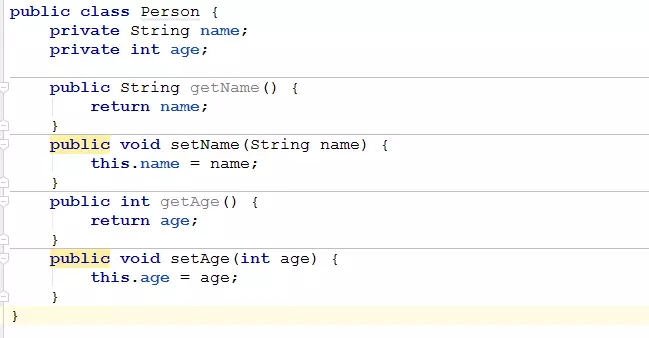
实现类依赖的Person类如下:
4.新增发布服务类 1 2 3 4 5 6 7 8 9 10 11 12 13 14 15 16 17 18 19 20 21 22 23 24 25 26 27 28 29 30 31 32 33 34 35 36 37 38 39 40 41 42 43 44 45 46 47 48 49 50 51 52 53 54 package com.tg.cxf; /** * <p>description:</p> * * @author tanggao * @date 2019/10/22 22:02 * @version 1.0 */ import org.apache.cxf.jaxws.JaxWsServerFactoryBean; /** * * ......................我佛慈悲...................... * _oo0oo_ * o8888888o * 88" . "88 * (| -_- |) * 0\ = /0 * ___/`---'\___ * .' \\| |// '. * / \\||| : |||// \ * / _||||| -卍-|||||- \ * | | \\\ - /// | | * | \_| ''\---/'' |_/ | * \ .-\__ '-' ___/-. / * ___'. .' /--.--\ `. .'___ * ."" '< `.___\_<|>_/___.' >' "". * | | : `- \`.;`\ _ /`;.`/ - ` : | | * \ \ `_. \_ __\ /__ _/ .-` / / * =====`-.____`.___ \_____/___.-`___.-'===== * `=---=' * ..................................................... ...... 一切有为法,如梦幻泡影,如露亦如电,应作如是观 ........ ......... 三界唯心,万法唯识 ........... ............ bug即空,空即bug,永无bug ............. ..................................................... */ public class CxfServer { public static void main(String[] args) { System.out.println("web Service start"); HelloWorldServiceImpl implementor = new HelloWorldServiceImpl(); String address="http://localhost/helloWorld"; JaxWsServerFactoryBean factoryBean = new JaxWsServerFactoryBean(); factoryBean.setAddress(address); //设置暴露地址 factoryBean.setServiceClass(HelloWorldService.class); //接口类 factoryBean.setServiceBean(implementor); //设置实现类 factoryBean.create(); System.out.println("web Service started"); } }
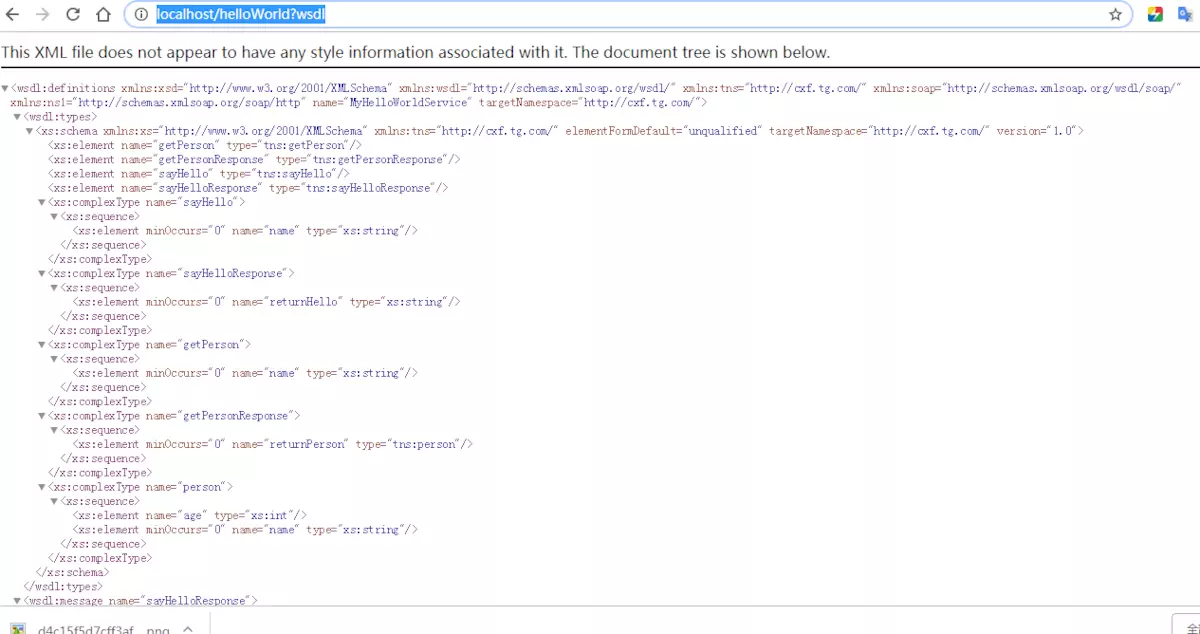
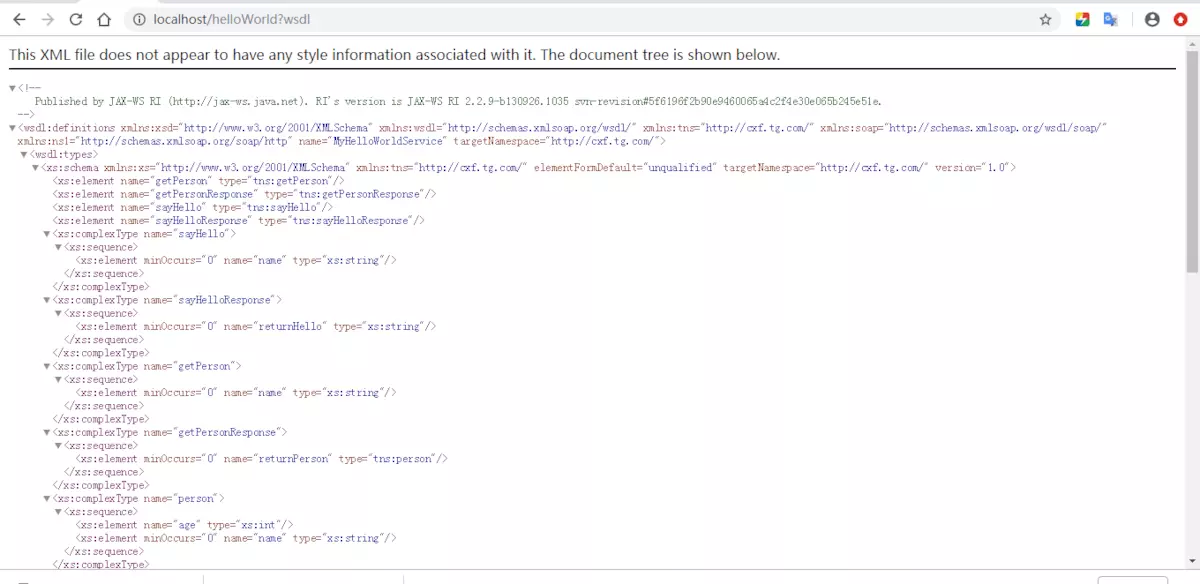
验证服务发布是否成功,访问wsdl,wsdl路径即为发布的路径加上?wsdl
http://localhost/helloWorld?wsdl
客户端开发步骤 1.获取wsdl文件 wsdl文件可以是实时的wsdl网址,比如:
http://localhost/helloWorld?wsdl
也可以是离线的wsdl文件
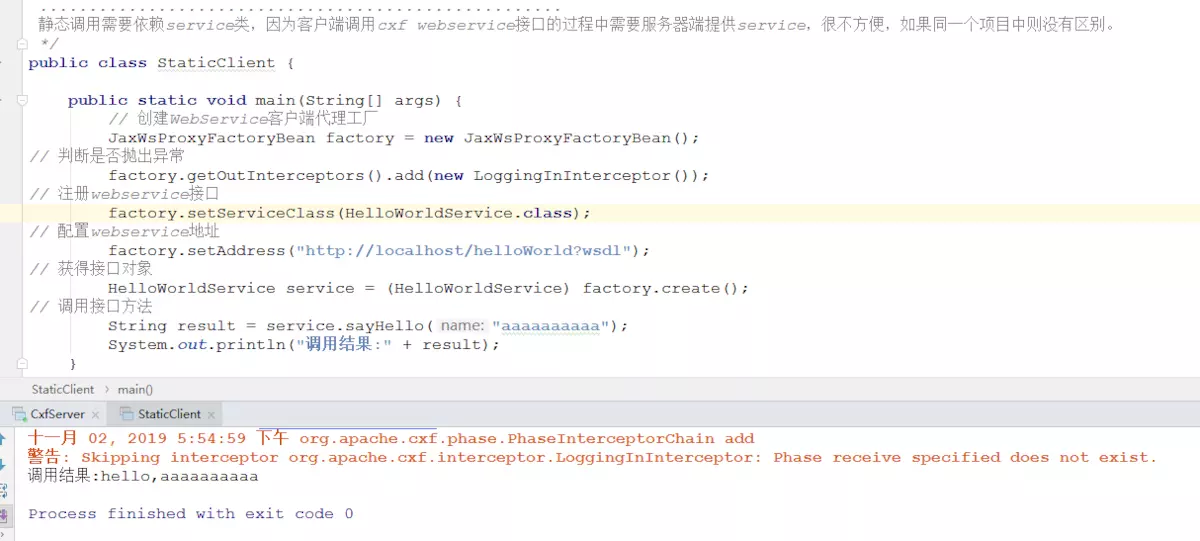
2.手动编写客户端静态调用代码 1 2 3 4 5 6 7 8 9 10 11 12 13 14 15 16 17 18 19 20 21 22 23 24 25 26 27 28 29 30 31 32 33 34 35 36 37 38 39 40 41 42 43 44 45 46 47 48 49 50 51 52 53 54 55 56 57 58 59 package com.tg.cxf; /** * <p>description:</p> * * @author tanggao * @date 2019/10/22 22:05 * @version 1.0 */ import org.apache.cxf.interceptor.LoggingInInterceptor; import org.apache.cxf.jaxws.JaxWsProxyFactoryBean; /** * * ......................我佛慈悲...................... * _oo0oo_ * o8888888o * 88" . "88 * (| -_- |) * 0\ = /0 * ___/`---'\___ * .' \\| |// '. * / \\||| : |||// \ * / _||||| -卍-|||||- \ * | | \\\ - /// | | * | \_| ''\---/'' |_/ | * \ .-\__ '-' ___/-. / * ___'. .' /--.--\ `. .'___ * ."" '< `.___\_<|>_/___.' >' "". * | | : `- \`.;`\ _ /`;.`/ - ` : | | * \ \ `_. \_ __\ /__ _/ .-` / / * =====`-.____`.___ \_____/___.-`___.-'===== * `=---=' * ..................................................... ...... 一切有为法,如梦幻泡影,如露亦如电,应作如是观 ........ ......... 三界唯心,万法唯识 ........... ............ bug即空,空即bug,永无bug ............. ..................................................... 静态调用需要依赖service类,因为客户端调用cxf webservice接口的过程中需要服务器端提供service,很不方便,如果同一个项目中则没有区别。 */ public class StaticClient { public static void main(String[] args) { // 创建WebService客户端代理工厂 JaxWsProxyFactoryBean factory = new JaxWsProxyFactoryBean(); // 判断是否抛出异常 factory.getOutInterceptors().add(new LoggingInInterceptor()); // 注册webservice接口 factory.setServiceClass(HelloWorldService.class); // 配置webservice地址 factory.setAddress("http://localhost/helloWorld?wsdl"); // 获得接口对象 HelloWorldService service = (HelloWorldService) factory.create(); // 调用接口方法 String result = service.sayHello("aaaaaaaaaa"); System.out.println("调用结果:" + result); } }
运行结果
静态调用需要依赖service类,因为客户端调用cxf webservice接口的过程中需要服务器端提供service,很不方便,如果同一个项目中则没有区别
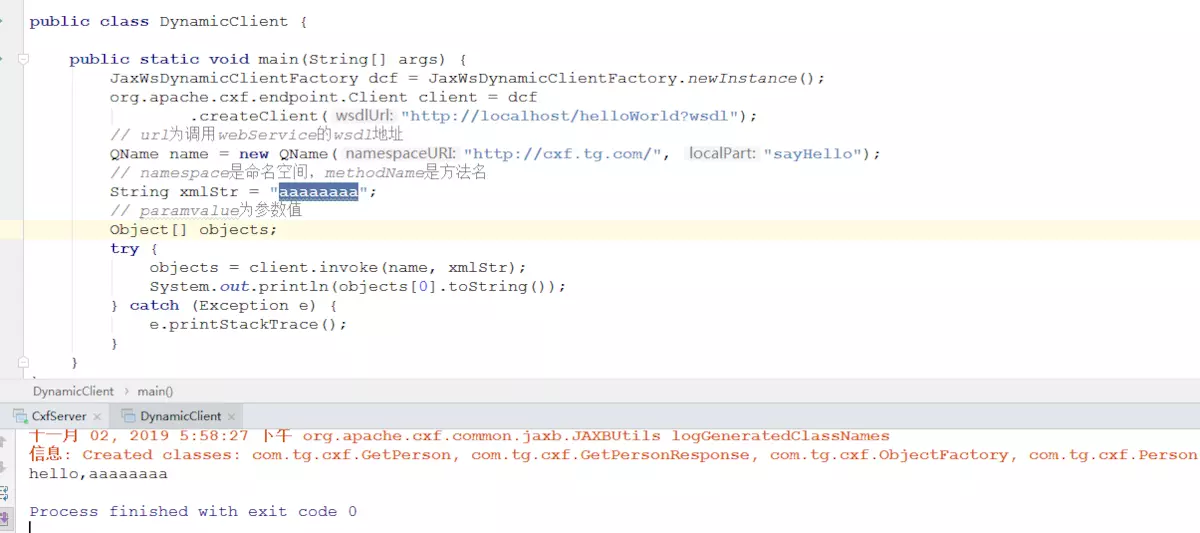
3.手动编写客户端动态调用代码 1 2 3 4 5 6 7 8 9 10 11 12 13 14 15 16 17 18 19 20 21 22 23 24 25 26 27 28 29 30 31 32 33 34 package com.tg.cxf; /** * <p>description:</p> * * @author tanggao * @date 2019/10/22 22:08 * @version 1.0 */ import org.apache.cxf.jaxws.endpoint.dynamic.JaxWsDynamicClientFactory; import javax.xml.namespace.QName; public class DynamicClient { public static void main(String[] args) { JaxWsDynamicClientFactory dcf = JaxWsDynamicClientFactory.newInstance(); org.apache.cxf.endpoint.Client client = dcf .createClient("http://localhost/helloWorld?wsdl"); // url为调用webService的wsdl地址 // namespace是命名空间,methodName是方法名 QName name = new QName("http://cxf.tg.com/", "sayHello"); String xmlStr = "aaaaaaaa"; // paramvalue为参数值 Object[] objects; try { objects = client.invoke(name, xmlStr); System.out.println(objects[0].toString()); } catch (Exception e) { e.printStackTrace(); } } }
运行结果
一般都不会自己写代码,都是通过工具生成客户端代码
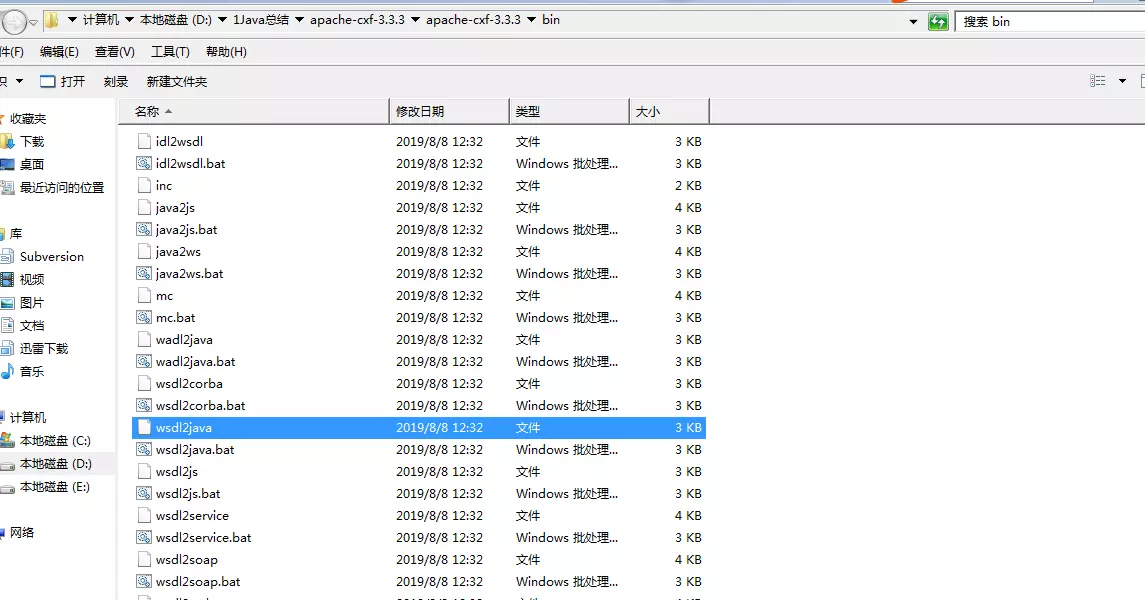
通过工具根据wsdl文件生成客户端调用类 官网下载cxf ,下载完后如下图
在bin目录中有一个wsdl2java命令
image.png
注意,如果要直接使用该命令,需要将bin加入环境变量中
1 2 3 4 5 6 7 8 9 10 11 12 13 14 15 16 17 18 19 20 21 22 23 24 25 26 27 28 29 30 31 32 33 34 35 36 37 38 39 40 41 42 43 44 45 46 47 48 49 50 51 52 53 54 55 56 57 58 59 60 61 62 63 64 65 66 67 68 69 70 71 72 73 74 75 76 77 78 79 80 81 82 83 84 85 86 87 88 89 90 91 92 93 94 95 96 97 98 99 100 101 102 <?xml version='1.0' encoding='UTF-8'?><wsdl:definitions xmlns:xsd="http://www.w3.org/2001/XMLSchema" xmlns:wsdl="http://schemas.xmlsoap.org/wsdl/" xmlns:tns="http://cxf.tg.com/" xmlns:soap="http://schemas.xmlsoap.org/wsdl/soap/" xmlns:ns1="http://schemas.xmlsoap.org/soap/http" name="MyHelloWorldService" targetNamespace="http://cxf.tg.com/"> <wsdl:types> <xs:schema xmlns:xs="http://www.w3.org/2001/XMLSchema" xmlns:tns="http://cxf.tg.com/" elementFormDefault="unqualified" targetNamespace="http://cxf.tg.com/" version="1.0"> <xs:element name="getPerson" type="tns:getPerson"/> <xs:element name="getPersonResponse" type="tns:getPersonResponse"/> <xs:element name="sayHello" type="tns:sayHello"/> <xs:element name="sayHelloResponse" type="tns:sayHelloResponse"/> <xs:complexType name="sayHello"> <xs:sequence> <xs:element minOccurs="0" name="name" type="xs:string"/> </xs:sequence> </xs:complexType> <xs:complexType name="sayHelloResponse"> <xs:sequence> <xs:element minOccurs="0" name="returnHello" type="xs:string"/> </xs:sequence> </xs:complexType> <xs:complexType name="getPerson"> <xs:sequence> <xs:element minOccurs="0" name="name" type="xs:string"/> </xs:sequence> </xs:complexType> <xs:complexType name="getPersonResponse"> <xs:sequence> <xs:element minOccurs="0" name="returnPerson" type="tns:person"/> </xs:sequence> </xs:complexType> <xs:complexType name="person"> <xs:sequence> <xs:element name="age" type="xs:int"/> <xs:element minOccurs="0" name="name" type="xs:string"/> </xs:sequence> </xs:complexType> </xs:schema> </wsdl:types> <wsdl:message name="sayHelloResponse"> <wsdl:part element="tns:sayHelloResponse" name="parameters"> </wsdl:part> </wsdl:message> <wsdl:message name="getPersonResponse"> <wsdl:part element="tns:getPersonResponse" name="parameters"> </wsdl:part> </wsdl:message> <wsdl:message name="sayHello"> <wsdl:part element="tns:sayHello" name="parameters"> </wsdl:part> </wsdl:message> <wsdl:message name="getPerson"> <wsdl:part element="tns:getPerson" name="parameters"> </wsdl:part> </wsdl:message> <wsdl:portType name="HelloWorldService"> <wsdl:operation name="sayHello"> <wsdl:input message="tns:sayHello" name="sayHello"> </wsdl:input> <wsdl:output message="tns:sayHelloResponse" name="sayHelloResponse"> </wsdl:output> </wsdl:operation> <wsdl:operation name="getPerson"> <wsdl:input message="tns:getPerson" name="getPerson"> </wsdl:input> <wsdl:output message="tns:getPersonResponse" name="getPersonResponse"> </wsdl:output> </wsdl:operation> </wsdl:portType> <wsdl:binding name="MyHelloWorldServiceSoapBinding" type="tns:HelloWorldService"> <soap:binding style="document" transport="http://schemas.xmlsoap.org/soap/http"/> <wsdl:operation name="sayHello"> <soap:operation soapAction="" style="document"/> <wsdl:input name="sayHello"> <soap:body use="literal"/> </wsdl:input> <wsdl:output name="sayHelloResponse"> <soap:body use="literal"/> </wsdl:output> </wsdl:operation> <wsdl:operation name="getPerson"> <soap:operation soapAction="" style="document"/> <wsdl:input name="getPerson"> <soap:body use="literal"/> </wsdl:input> <wsdl:output name="getPersonResponse"> <soap:body use="literal"/> </wsdl:output> </wsdl:operation> </wsdl:binding> <wsdl:service name="MyHelloWorldService"> <wsdl:port binding="tns:MyHelloWorldServiceSoapBinding" name="HelloWorldServicePort"> <soap:address location="http://localhost/helloWorld"/> </wsdl:port> </wsdl:service> </wsdl:definitions>
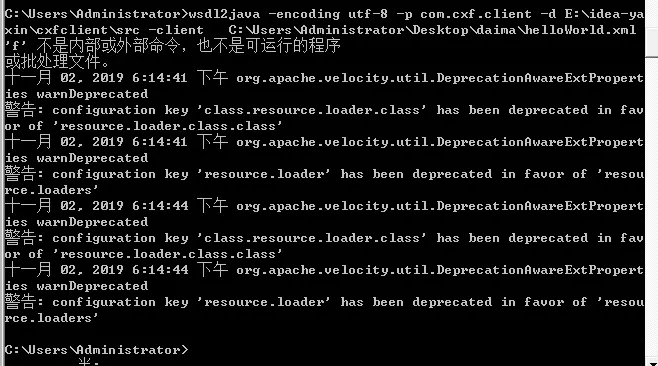
打开cmd ,输入
1 wsdl2java -encoding utf-8 -p com.asiainfo.ws.boss -d E:\idea-yaxin\cxfclient\src -client C:\Users\Administrator\Desktop\daima\helloWorld.xml
参数
1 2 3 4 -encoding 指定编码集 -p 指定其wsdl的命名空间,也就是要生成代码的包名: -d 指定要产生代码所在目录 -client 生成客户端测试web service的代码
在指定工程路径下生产了客户端代码
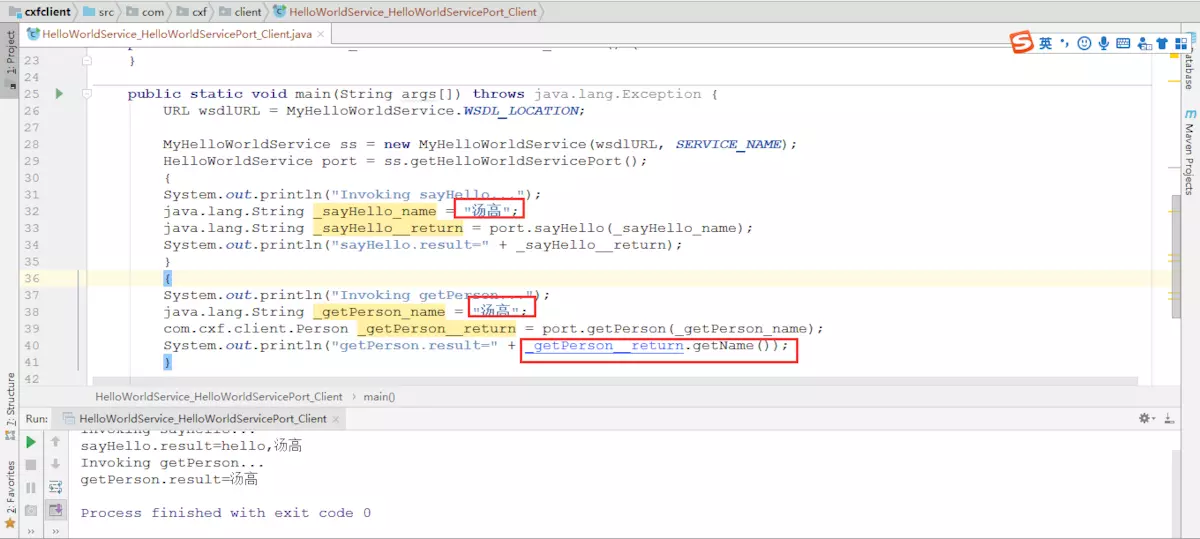
因为生成代码时指定了参数 -client,所以客户端调用类HelloWorldService_HelloWorldServicePort_Client 也生成了,如下类
1 2 3 4 5 6 7 8 9 10 11 12 13 14 15 16 17 18 19 20 21 22 23 24 25 26 27 28 29 30 31 32 33 34 35 36 37 38 39 40 41 42 43 44 45 46 47 48 49 50 51 52 53 54 55 56 57 58 59 package com.cxf.client; /** * Please modify this class to meet your needs * This class is not complete */ import javax.xml.namespace.QName; import java.io.File; import java.net.MalformedURLException; import java.net.URL; /** * This class was generated by Apache CXF 3.3.3 * 2019-11-02T18:14:45.976+08:00 * Generated source version: 3.3.3 * */ public final class HelloWorldService_HelloWorldServicePort_Client { private static final QName SERVICE_NAME = new QName("http://cxf.tg.com/", "MyHelloWorldService"); private HelloWorldService_HelloWorldServicePort_Client() { } public static void main(String args[]) throws java.lang.Exception { URL wsdlURL = MyHelloWorldService.WSDL_LOCATION; if (args.length > 0 && args[0] != null && !"".equals(args[0])) { File wsdlFile = new File(args[0]); try { if (wsdlFile.exists()) { wsdlURL = wsdlFile.toURI().toURL(); } else { wsdlURL = new URL(args[0]); } } catch (MalformedURLException e) { e.printStackTrace(); } } MyHelloWorldService ss = new MyHelloWorldService(wsdlURL, SERVICE_NAME); HelloWorldService port = ss.getHelloWorldServicePort(); { System.out.println("Invoking sayHello..."); java.lang.String _sayHello_name = ""; java.lang.String _sayHello__return = port.sayHello(_sayHello_name); System.out.println("sayHello.result=" + _sayHello__return); } { System.out.println("Invoking getPerson..."); java.lang.String _getPerson_name = ""; com.cxf.client.Person _getPerson__return = port.getPerson(_getPerson_name); System.out.println("getPerson.result=" + _getPerson__return); } System.exit(0); } }
直接修改一下传入的参数,查看运行结果
通过wsdl文件生成服务端代码 还可以通过已经制定好的wsdl文件生成服务端代码,
生成服务端命令
1 wsdl2java -encoding utf-8 -p com.cxf.server -impl -d E:\idea-yaxin\cxfserver\src -server C:\Users\Administrator\Desktop\daima\helloWorld.xml
参数
1 2 3 4 5 -encoding 代码编码集 -p 指定其wsdl的命名空间,也就是要生成代码的包名: -d 指定要产生代码所在目录 -server 生成服务器启动web service的代码 -impl 生成web service的服务端代码
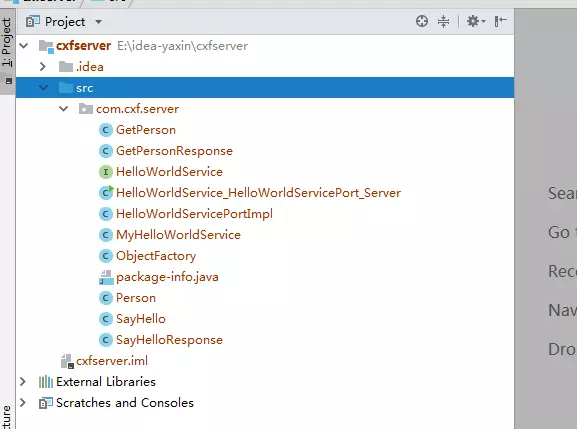
在指定工程生成了服务端代码
image.png
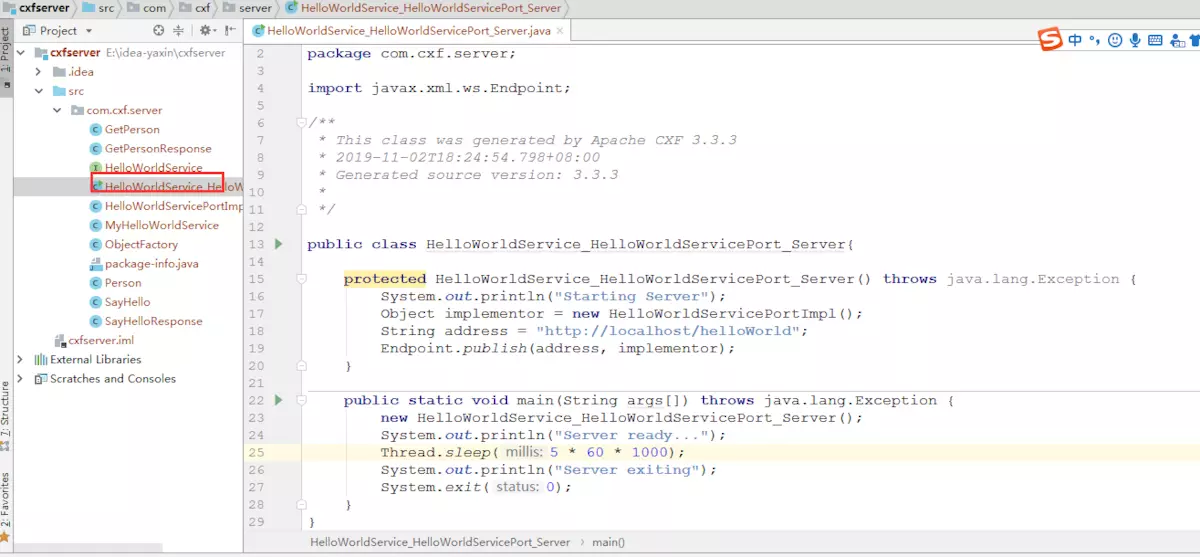
因为指定了参数-server ,所以生成了启动类HelloWorldService_HelloWorldServicePort_Server
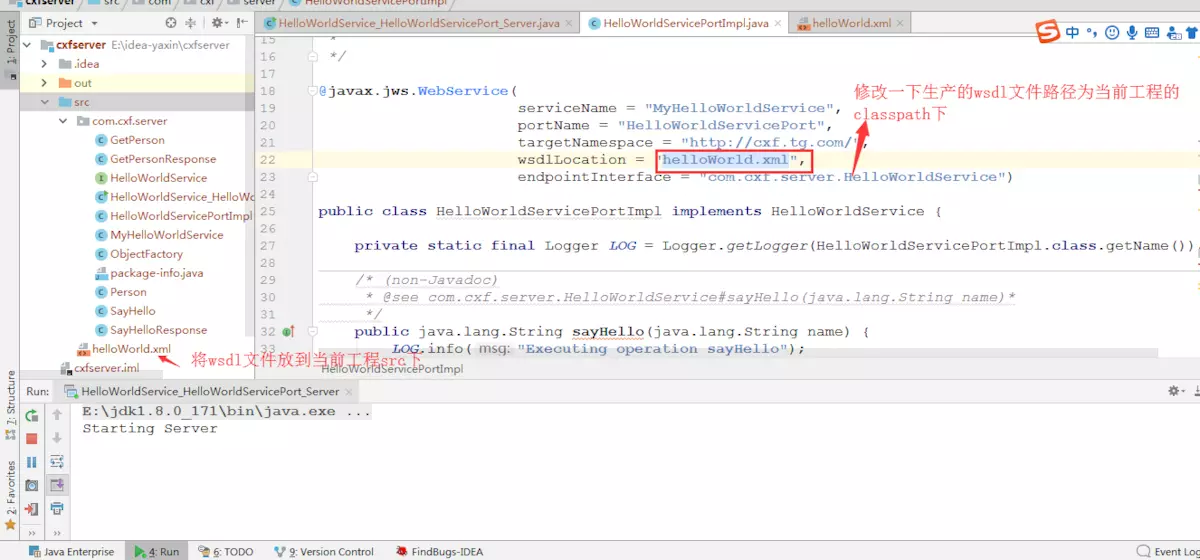
修改一下生成类的wsdl文件路径
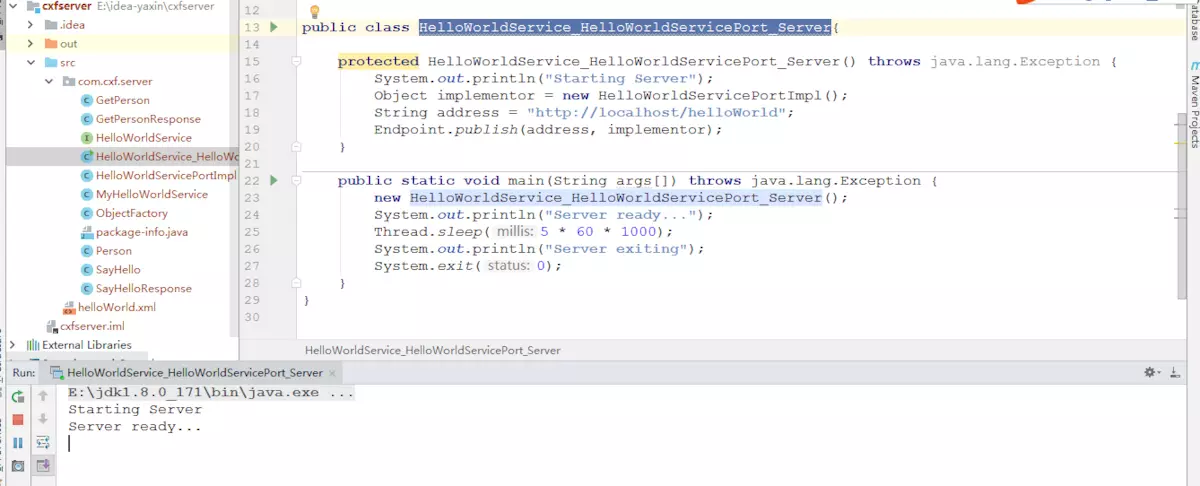
直接启动HelloWorldService_HelloWorldServicePort_Server类
查看wsdl文件
到此为止,webservice服务端代码生成成功!
转载请注明来源,欢迎对文章中的引用来源进行考证,欢迎指出任何有错误或不够清晰的表达。可以在下面评论区评论,也可以邮件至 451261884@qq.com
文章标题: WebService学习系列之CXF开发WebService
文章字数: 3.1k
本文作者: 汤高
发布时间: 2019-11-02, 21:55:42
最后更新: 2019-11-02, 23:38:03
原始链接: https://tanggao1314.github.io/2019/11/02/WebService学习系列之CXF开发WebService/
版权声明: "署名-非商用-相同方式共享 4.0" 转载请保留原文链接及作者。